
Genea Integration Instructions
Configure API Key in Genea
- Login to your Genea account and access the Global Overview.

- Select API Keys.

- Select + New.
- Enter a desired Name and Description (optional).
- Give Full Access to these items:
- Monitoring
- Webhook Management
- API Key Management

- Click Save.
- You will be presented with an API Key. Copy this key to a secure location; this is the only time the key will be shown to you.
- Click Close.
Enable Genea in OpenEye Web Services (OWS)
- Go to Management > Integrations in your OpenEye Web Services (OWS) End User Portal.
- Choose Genea and click Next.
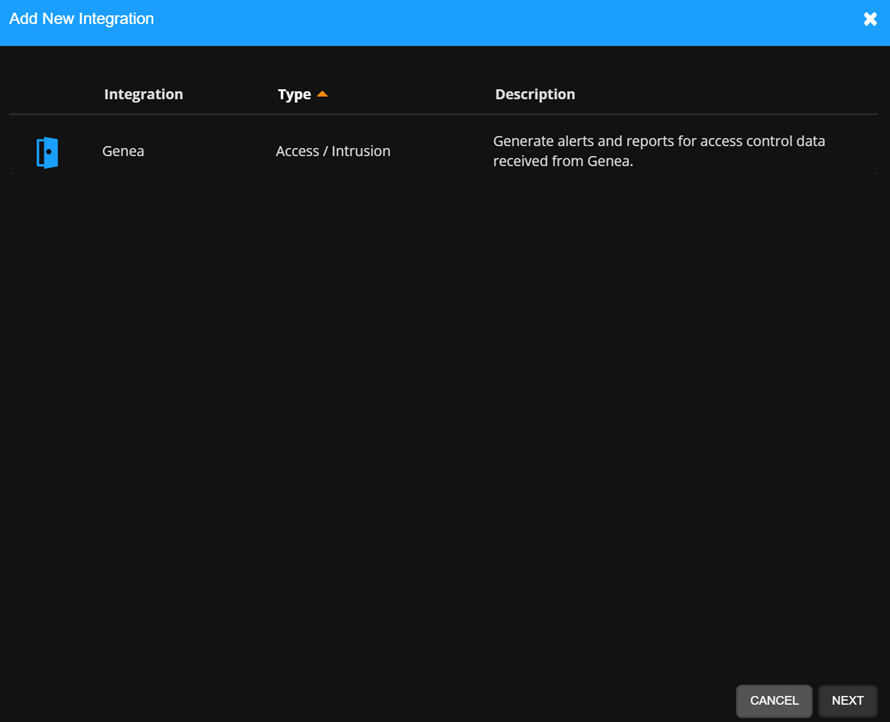
- The Genea integration will be added to the Manage Integrations list.

- Click Edit to enable or disable the Genea Integration in General Settings.
- Check Enable Genea Integration and enter the Api Key that was created in your Genea account.

- Press Save.
NOTE: After linking an account, any new devices added to the Genea system can take 20 minutes to sync back to OWS.
NOTE: Last Successful Sync shows the last time and date OWS successfully synced with the linked account.
NOTE: Last Event Received shows the last time and date OWS received an event from the account.
NOTE: Validate Account manually resends the account credentials to confirm linking is still valid.
-
Press Door / Camera Mapping.

- Select your Door.
- Press Add Camera and select the desired camera to link to the reader.
- Press Location / Location Mapping.

- Select the Genea location.
- Press Add Location and select the location to link to the Genea account.
OWS Alert Configuration
Create a New Intrusion Alert Rule
Select one of the Door Access or Access Control Alert Types when Creating a New Alert Rule:

When creating an Alert Rule, Event Types further define the event notification:
| Door Access Event Types | |
|---|---|
| Door Opened | Includes Card Holder Information |
| Access Denied | Includes Card Holder Information [where applicable] |
| Access Denied | Late to Arm |
| Access Control Event Types | |
|---|---|
| Door Forced Open | No Selection Required |
| Door Held Open |
Add Users to an Alert Rule
NOTE: Adding Users to a rule automatically grants them permission to view alerts for cameras and locations they have access to based on their User Group permissions.
- Click Users/Notifications on the left-hand menu.

- Click Add User or Add Group.

- Click + next to each User or Group to send emails and push notifications when the alert is triggered.

- Click Add when finished.

NOTE: To receive email, push or client alert notifications, the Email Alert, Push Alert or Client Alert box must be checked. Simply adding a user only gives them access to see this alert’s history. See Alert Notifications for details.
NOTE: Cardholders can be added to a Door Access Alert Rules. Go to How to Add Cardholders to an Alert Rule for more information.
Updating, Disabling, or Deleting an Alert Rule
- Click General Info on the navigation sidebar.

- Edit the Name and Description as desired.

- Click Disable Rule to turn the Alert Rule off without deleting it.
- Click Delete Rule to permanently remove the Alert Rule and delete all history associated with it.
- Click Clear All Active Alerts to permanently remove only the Active Alerts from the history associated with the Alert Rule.
- Click Save when finished.
NOTE: The Name given to an alert will appear as the subject line of email notifications sent by that alert.
Alert History
In OWS, select Alerts > Alert History. Here you will find all Alert events created by associated recorders that have rules assigned.
Hovering over the camera icon will show a snapshot of the video clip before viewing it. By selecting view, you will be taken to the video created by the camera associated with that event.
Notifications
Email alerts and mobile push notifications will be sent based on any access control event:
Email Alerts: Any User or User Group checked to receive email alerts for an event, are notified with Account, Recorder, Camera, Zone, Date and Time information as well as a thumbnail image and links that allow additional Event monitoring.
Push Notifications: A User or User Group that have Push Notifications enabled in an Alert Rule and have the OpenEye mobile app installed will receive notifications on their mobile device with information, a screenshot, and associated video whenever an alarm condition is detected.
Genea Access
The same events in OWS are also viewable in the Genea Event Tracker. The name of some of the events may appear different between OWS and Genea.
Supported Event Types
| Door Access / Access Control Event Types | ||
|---|---|---|
| Alert Rule | OWS Event Type | Genea Access |
| DOOR ACCESS - ACCESS GRANTED | ||
| Door Access | Access Granted | Access Granted |
| Door Access | Access Granted | Door Access Mode Unlocked |
| Door Access | Access Granted | Access Granted Access Point Unlock |
| Door Access | Access Granted | Access Granted Facility Code Verified Door Not Used |
| Door Access | Access Granted | Access Granted Facility Code Verified Door Used |
| Door Access | Access Granted | Access Granted Anti Passback Violation |
| Door Access | Access Granted | Access Granted Anti Passback Violation Door Not Used |
| Door Access | Access Granted | Access Granted Anti Passback Violation Card Used |
| Door Access | Access Granted | Access Granted Duress Door Used |
| Door Access | Access Granted | Access Granted Duress Door Not Used |
| Door Access | Access Granted | Access Granted Full Test Door Not Used |
| Door Access | Access Granted | Access Granted Full Test Door Used |
| Door Access | Access Granted | Access Granted Double Card |
| Door Access | Access Granted | Access Granted Double Card Uncontrolled |
| Door Access | Access Granted | Access Granted Local Verification Door Not Used |
| Door Access | Access Granted | Access Granted Local Verification Door Used |
| Door Access | Access Granted | Access Granted Request Door Use Not Verified |
| Door Access | Access Granted | Access Granted Door Not Used |
| Door Access | Access Granted | Access Granted Door Used |
| DOOR ACCESS - DOOR CLOSED | ||
| Door Access | Door Closed | Door Contact - Door Closed |
| DOOR ACCESS - ACCESS INVALID PIN | ||
| Door Access | Access Invalid Pin | Access Denied - Card Format Not Matched |
| Door Access | Access Invalid Pin | Access Denied - Invalid Facility Code |
| Door Access | Access Invalid Pin | Access Denied - Card/PIN Not Found |
| Door Access | Access Invalid Pin | Access Denied - Host Approval Denied |
| Door Access | Access Invalid Pin | Access Denied - Physical Inspection Required |
| Door Access | Access Invalid Pin | Access Denied - Not Active |
| Door Access | Access Invalid Pin | Access Denied - Expired |
| Door Access | Access Invalid Pin | Access Denied - Invalid PIN |
| Door Access | Access Invalid Pin | Access Denied - Elevators Unknown Error |
| Door Access | Access Invalid Pin | Access Denied - Invalid Issue Code |
| Door Access | Access Invalid Pin | Access Denied - Card Access Revoked / De-activated Card |
| Door Access | Access Invalid Pin | Access Denied - Incomplete CARD & PIN Sequence |
| Door Access | Access Invalid Pin | Access Denied - De-activated Card |
| Door Access | Access Invalid Pin | Access Denied - User Suspended |
| DOOR ACCESS - ACCESS INVALID TIME | ||
| Door Access | Access Invalid Time | Access Denied - Out of Schedule |
| DOOR ACCESS - ACCESS DENIED TO DOOR | ||
| Door Access | Access Denied to Door | Access Denied - Unauthorized Assets |
| Door Access | Access Denied to Door | Access Denied - No Door Access |
| Door Access | Access Denied to Door | Access Denied - Elevators Floor Not in Floors Served |
| Door Access | Access Denied to Door | Access Denied - Elevators Floor Request Not Authorized |
| Door Access | Access Denied to Door | Access Denied - Anti-Passback Violation |
| ACCESS CONTROL - DOOR STATUS | ||
| Door Status | Door Forced Open | Door Contact - Forced Open (Forced Open and Held Open both Disabled) |
| Door Status | Door Forced Open | Door Contact - Forced Open (Held Open is Disabled) |
| Door Status | Door Forced Open | Door Contact - Forced Open |
| Door Status | Door Forced Open | Door Contact - Forced and Held Open |
| ACCESS CONTROL - PANEL/DEVICE | ||
| Panel/Device | Device Tampering | Interface Panel Tamper - Disconnected |
| Panel/Device | Device Tampering | Interface Panel Tamper - Unknown |
| Panel/Device | Device Tampering | Interface Panel Tamper - Alarm |
| Panel/Device | Device Tampering | Interface Panel Tamper - Fault |